Stop Auto-Dubbing on YouTube!
Automatically force your preferred audio track language on YouTube Videos and Shorts. Enjoy the original voice of your favorite creators.
Install for Freev1.0 • Compatible with Chrome, Edge & Brave

Automatically force your preferred audio track language on YouTube Videos and Shorts. Enjoy the original voice of your favorite creators.
Install for Free
A simple solution for a global frustration.
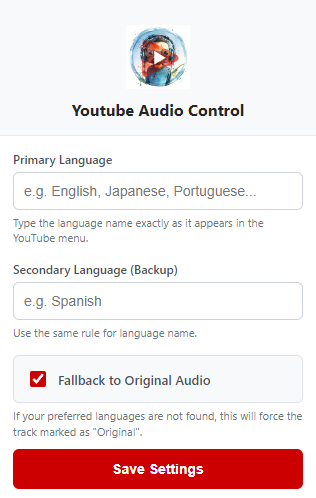
Set your Primary and Secondary languages. The extension checks available tracks and switches instantly.
Prefer the real thing? Our smart fallback logic detects the "Original" track even if it's not in your list.
Works seamlessly on standard Videos and YouTube Shorts, even when you swipe to the next video.
Add it to your browser from the Chrome Web Store.
Click the icon and type your preferred languages (e.g., "English", "Japanese").
Open any YouTube video. We fix the audio automatically in the background!
We believe in privacy by design.
YT Audio Control saves your language preferences locally on your device (using Chrome Storage). We do not collect, track, or sell your personal data, watch history, or browsing habits. The extension only interacts with the YouTube player to switch the audio track.
This extension is developed by an independent developer and writer.
Your support helps keep it free and updated!